- Tested with
- CLIO Coder 0.4.9, WTF-P 0.7.3, CiteNexus 0.2.2
- Current release
- CLIO Coder v0.7.0, November 9, 2026
- Tested on
- Environment
- Linux
September 27, 2026: This walkthrough retains its original tested CLIO Coder v0.4.9 instructions. Starting with v0.5.6, the old autonomy names are rejected; default and yolo are the supported levels, and read-only is a separate dispatch restriction. Use the current product guides for a new installation. The full workflow below has not been retested against v0.5.7.
Every coding agent I have tried can write a fluent related-work paragraph in ten seconds. Most will also cite a paper that does not exist, forget by Thursday what we decided on Monday, and leave me unable to say which sentences carry my judgment. The model is capable. What it lacks is a research method.
So the lab built one, in three open pieces:
- CLIO Coder is the agent harness: it runs a model you choose, reads your folder, and decides what waits for your approval. It is the hands-on component I maintain inside CLIO, part of IOWarp.
- WTF-P (Write The F***ing Paper, where P also means proposal, presentation, and poster) is the method. It gives the agent
/wtfp:*actions that interview you, map your materials, outline with a word budget, then plan, draft, and review one section at a time. Every decision is saved in a.planning/directory next to your manuscript, so next week’s session resumes from disk. Each stage stops at a gate, a point only you can cross. - CiteNexus is the evidence layer: a scholarly search server that returns each record as a candidate, meaning a pointer with its source URL, retrieval time, and the provider behind every field.
.planning/.The pieces are independent: WTF-P also installs on Claude Code and five other coding agents, and CiteNexus works with any Model Context Protocol client. I describe this stack because every layer is open and runs on a model you choose.
Prerequisites
This path is tested on Linux. Other platforms are not yet covered here.
- Node.js 22.19 or newer with npm. CLIO Coder sets that floor; WTF-P alone needs Node.js 20.
- Python 3.11 or newer, and uv for a one-line CiteNexus install.
- A model for CLIO Coder to talk to: a local server such as LM Studio, Ollama, or llama.cpp, a lab gateway, or a cloud API. For one GPU, see Run CLIO Coder against a model on your own GPU.
- A real folder for what you are writing, holding your notes, drafts, the call for papers, and any
.bibfile.
I tested everything below on September 17, 2026 with CLIO Coder 0.4.9, WTF-P 0.7.3, and CiteNexus 0.2.2. My CLIO Coder was a build of 0.4.9 ahead of its npm release. WTF-P requires CLIO Coder 0.4.7 or newer, which the version on npm already satisfies, and the research step needs WTF-P 0.7.2 or newer.
1. Install CLIO Coder and connect a model
npm install -g @iowarp/clio-coder
clio-coder configure
Choose Quick Connect, paste your endpoint URL (localhost:1234 for LM Studio, localhost:11434 for Ollama, or your gateway’s address), supply a key and pick a model if asked, then review and connect. Clio calls a configured endpoint a target, and clio-coder targets --probe confirms it answers.
2. Install WTF-P into Clio
npx --yes --package=wtf-p@latest -- wtf-p install clio
clio-coder library inspect wtfp --user --json
Keep that exact npx form, and pin a version such as wtf-p@0.7.3 when a paper artifact must be reproducible. The lines to check in the second command’s output, trimmed from my machine:
{
  "id": "wtfp",
  "version": "0.7.3",
  "enabled": true,
  "valid": true,
  "compatible": true,
  "loadable": true
}
3. Install CiteNexus
uv tool install cite-nexus-mcp
cite-nexus-wtfp --check
WTF-P never installs CiteNexus for you. It looks for cite-nexus-wtfp on your PATH. The check starts the real server and lists providers without querying them. Trimmed from my run:
{
  "providers": {
    "providers": [
      { "id": "crossref", "available": true, "default": true },
      { "id": "arxiv", "available": true, "default": false }
    ]
  },
  "metadata": { "backend": "cite-nexus", "version": "0.2.2", "transport": "mcp-stdio" }
}
Crossref, DataCite, and Europe PMC are the defaults and need no key. arXiv and Semantic Scholar are free but join a search only when you name them, and so does any keyed index such as Scopus.
4. A first session
The example is a four-page workshop paper. Start Clio in your folder in supervised mode, where the agent proposes and you approve:
cd ~/papers/my-workshop-paper
clio-coder --autonomy suggest
Enter one action at a time and finish each before the next. The method works because you are present at every decision.
/wtfp:helpprints the action list without calling the model, which proves the plugin loaded. Its first line on my machine readsWTF-P 0.7.3 on Clio Coder: evidence-grounded academic writing./wtfp:new-paperwith a brief, such as:I am preparing a four-page workshop paper on our storage benchmark results. Interview me before deciding scope or claims, and mark unknowns instead of inventing citations.The agent interviews you, then previews the initial project records. You decide the question, the contribution, and the venue limits. You approve the write that creates.planning/. Nothing is on disk before that./wtfp:map-projectinventories the drafts, figures, data notes, and references already in the folder. You decide what is in scope and correct anything it misread./wtfp:create-outlineproposes sections, the argument, and a word budget, and gives each section a stable identifier. You approve the outline, then use those identifiers from here on./wtfp:research-gap related-workresearches the literature one section needs. Name the search and the providers in the same request, because that list is what you approve before anything touches the network:Use citation-search with --backend=cite-nexus and --providers=crossref,arxiv for hierarchical storage and I/O buffering in HPC.You decide which candidates matter. You approve what enters the evidence table and the bibliography./wtfp:discuss-section,/wtfp:plan-section,/wtfp:write-section, and/wtfp:review-sectionrepeat per section. The agent captures your intent, produces a checked plan, drafts only from the approved plan and evidence, and records review findings without rewriting. You approve each plan and each draft.
You can run the same search the agent runs. I ran this:
node ~/.config/clio-coder/plugins/wtfp/tools/wtfp-tool.js citation-search \
  --backend=cite-nexus --query="I/O buffering hierarchical storage HPC" \
  --limit=3 --timeout=40
The first result and the search summary, trimmed from the real output:
{
  "results": [
    {
      "id": "doi:10.1109/cluster.2018.00025",
      "title": "UniviStor: Integrated Hierarchical and Distributed Storage for HPC",
      "verification": "candidate",
      "citeNexus": { "is_retracted": null, "sources": [{ "provider": "crossref" }] }
    }
  ],
  "metadata": { "version": "0.2.2", "total": 8, "returned": 3, "errors": [] }
}
Read "verification": "candidate" literally. CiteNexus established that a record with this DOI exists at Crossref. It did not establish that the paper supports your sentence, and "is_retracted": null means unknown, not clean. /wtfp:check-refs audits a finished bibliography through the same search. CiteNexus is also an ordinary MCP server, so you can register it in Clio’s MCP configuration for quick lookups outside a section’s research record.
To stop for the day, run /wtfp:pause-writing, which writes a handoff into .planning/, and quit Clio. Tomorrow, from the same folder, /wtfp:resume-writing picks up from disk. /wtfp:create-poster turns the same argument and evidence into a laid-out poster with a claim ledger. /wtfp:create-slides does the same for a talk. For a grant, follow the proposal workflow.
What you decide and what you approve
A gate is not a courtesy prompt. When I recorded a session to start a conference poster, I told the agent to use defaults and not to interview me further. It still stopped, because no instruction in a prompt can cross an author gate.
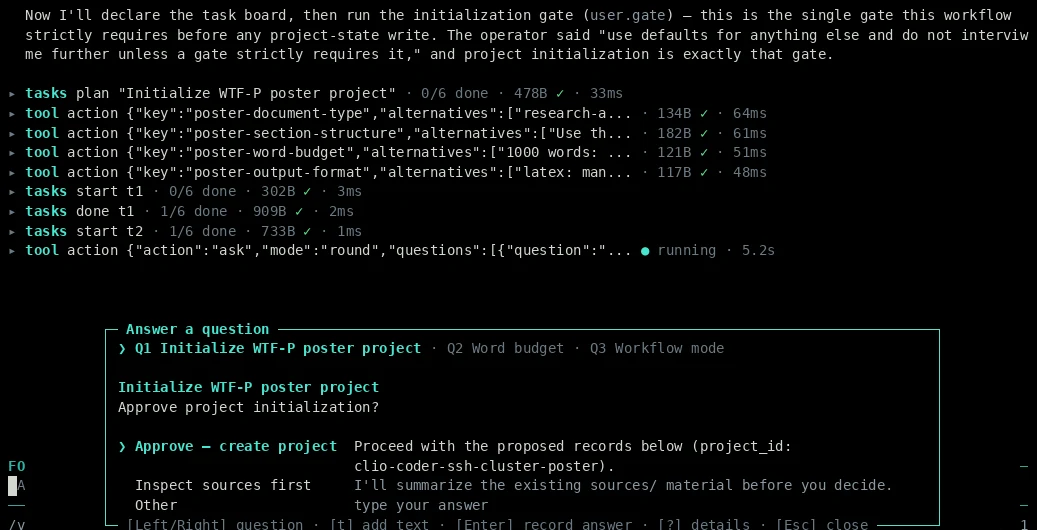
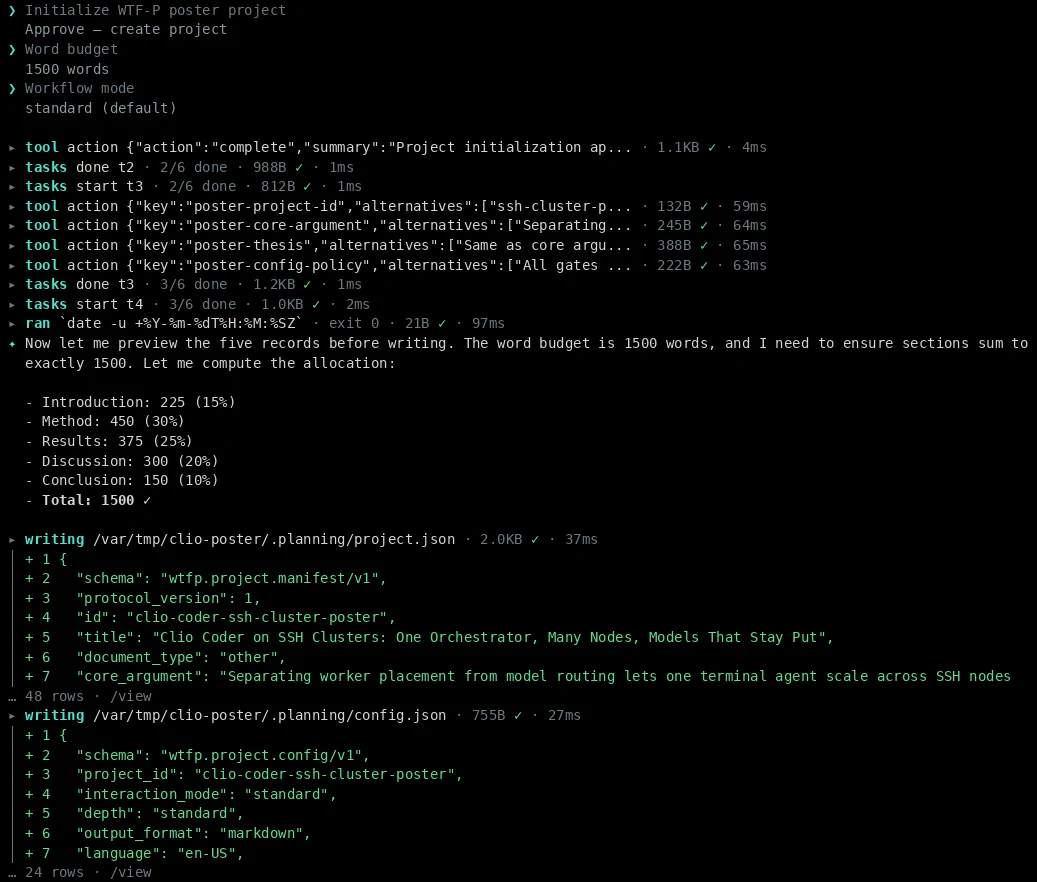
.planning/ shown as a diff.Upgrade and removal
To upgrade WTF-P, run the install command again. Since 0.7.3 it replaces the files it owns and keeps any you edited. Each layer comes out independently:
npx --yes --package=wtf-p@latest -- wtf-p uninstall clio --yes
uv tool uninstall cite-nexus-mcp
npm uninstall -g @iowarp/clio-coder
Use --dry-run in place of --yes to preview the first one, and prefer it over clio-coder library remove wtfp, which leaves a version receipt behind. None of these touch your project’s .planning/ or paper/ directories.
Troubleshooting
A search returns fewer results than expected, or none. Look at metadata.errors first. One provider can time out or rate-limit while the others answer, and the partial failure is recorded there. An empty result with errors means a source was unavailable, not that the literature is absent.
WTF-P cannot find CiteNexus. Confirm cite-nexus-wtfp --check works in the shell that launches Clio. If you installed into a virtual environment, export the absolute path first:
export WTFP_CITE_NEXUS_COMMAND="$HOME/.local/share/cite-nexus/bin/cite-nexus-wtfp"
An action returns WTFP_ACTION_UNAVAILABLE. That is a deliberate refusal. On CLIO Coder 31 of the 36 actions are available. The other five (contribute, report-bug, request-feature, remove-section, and update) fail closed, so do not ask the model to improvise around them.
Limitations
- I ran the install checks,
/wtfp:help, and the citation search above, and the two images are frames from my own session. The session prompts are illustrative. - All three projects are early software below 1.0. Interfaces can change, and a session is only as good as the model you point it at.
- Linux only for now. The CiteNexus companion does not forward proxy or CA-bundle variables, so networks that require them are unsupported.
- The research actions reach CiteNexus on CLIO Coder and Claude Code only.
- WTF-P does not render, compile, submit, or touch Git. Poster, slide, and LaTeX actions emit source and hand you the build step.
- Nothing here verifies a scientific claim. A candidate citation is a pointer, not proof, and a passed review is a checkpoint. Reading the paper and owning the argument remain your job, by design.
Try it, break it, tell us
I built this for my own students first. A first-year PhD student should be able to open a folder on Monday, be interviewed about what the paper claims, and on Friday still know why every sentence is there and where every citation came from.
- CLIO Coder: star or try it, file an issue, contribute.
- WTF-P: star or try it, file an issue, contribute.
- CiteNexus: star or try it, file an issue, contribute.
The most useful report names the action you ran, what you expected, what happened, and the versions, with unpublished text removed. Students in my lab: start your next workshop paper this way and bring me what annoyed you. Everyone else, the invitation is the same, and a provider for your field or a venue template is a good first contribution.